AML Change Monitoring - 5 Minutes Tutorial - API Integration
Prerequisites
The following information is required to be able to integrate with Authologic:
- Developer portal credentials,
- API Keys.
Developer Portal Credentials
The developer portal address and credentials were provided during onboarding.
Passwords And API Keys
During the onboarding you have received the API keys:
- API key allowing communication with Authologic.
- The key used to verify the data sent by Authologic by the callback mechanism.
Integration Overview
The entire process is called conversation. The following diagram represents the process logical flow:
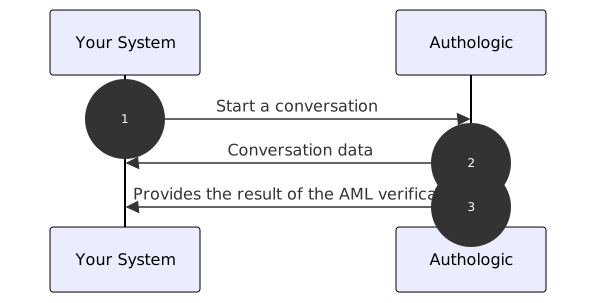
- Start of the identity verification process. Your server calls the API method called: POST /api/conversations
- The response returns information about conversation identifier and status
- Authologic calls a callback on your server's side with the result of the verification
Create a Conversation
The AML product describes how to create a user verification that includes one-time check of AML lists. However, in multiple cases you are interested in the changes to the AML list related to the user, so that you know when that person potentially appears on one of the sanction list.
Basic Auth based authentication described, among others, at
here(opens in new tab). Username and API key should be used as data.
By using the curl tool we use the -u option which is responsible for the use of Basic Auth.We will modify the example of setting up a conversation that we've used in our tutorial so that Authologic informs you us about any changes to the given AML lists related to this user:
curl -X POST -u my_login "https://sandbox.authologic.com/api/conversations" \
-H "accept: application/vnd.authologic.v1.1+json" \
-H "Content-Type: application/vnd.authologic.v1.1+json" \
-d '{
  "userKey": "7dfb9ded-c38f-49ae-95e2-307283a0b1f6",
  "returnUrl": "https://id.sandbox.authologic.com/c/{conversationId}/thankYou",
  "callbackUrl": "your_callback_url_here",
  "query": {
    "identity": {
      "requireOneOf": [
        [ "PERSON_NAME_FIRSTNAME", "PERSON_NAME_LASTNAME"]
      ]
    },
    "aml": {
      "checks": ["PEP", "SANCTIONS", "ADVERSE_MEDIA", "SIP", "OTHER"],
      "subscription": {}
    }
  }
}'
The difference in the query is adding the fragment: "subscription": {}. The answer is automatically expanded
for subscription status, e.g .:
{
  "id": "c12c1adc-3ff0-4d32-b95c-c593135c903e",
  "userKey": "7dfb9ded-c38f-49ae-95e2-307283a0b1f6",
  "url": "https://sandbox.authologic.com/c/c12c1adc-3ff0-4d32-b95c-c593135c903e",
  "status": "CREATED",
  "result": {
    "identity": {
      "status": "IN_PROGRESS",
      "user": {}
    },
    "aml": {
      "status": "IN_PROGRESS",
      "subscription": {
        "active": true
      }
    }
  }
}
After the first check, there will also be an additional lastChanged field containing the date the last content change was detected
AML lists provided in the query.
{
  "id": "c12c1adc-3ff0-4d32-b95c-c593135c903e",
  "userKey": "7dfb9ded-c38f-49ae-95e2-307283a0b1f6",
  "url": "https://sandbox.authologic.com/c/c12c1adc-3ff0-4d32-b95c-c593135c903e",
  "status": "FINISHED",
  "result": {
    "identity": {
      "status": "FINISHED",
      "user": {
        "person": {
          "name": {
            "firstName": "Maria",
            "lastName": "Sochacka"
          }
        }
      }
    },
    "aml": {
      "status": "FINISHED",
      "found": ["PEP", "SANCTIONS", "ADVERSE_MEDIA", "SIP", "OTHER"],
      "subscription": {
        "active": true,
        "lastChanged": "2022-08-12T13:42:53.018798Z"
      }
    }
  },
  "info": [
    {
      "country": "PL",
      "method": "PSD2"
    }
  ]
}
Information About Changes
After detecting changes in monitored AML lists, Authologic automatically sends information about it via the callback mechanism,
where target = SUBSCRIPTION and event = NEW_DATA. The general structure of callbacks is described in the dedicated
callbacks section.
Subscription Cancellation
Authlogic performs AML monitoring until the subscription is canceled. This continues until the
DELETE /api/subscriptions/{conversationId}/aml method call. After successfully unsubscribing,
the system responds with a header HTTP: 204 No Content.