AML With Identity - 5 Minutes Tutorial - API Integration
Prerequisites
The following information is required to be able to integrate with Authologic:
- Developer portal credentials,
- API Keys.
Developer Portal Credentials
The developer portal address and credentials were provided during onboarding.
Passwords And API Keys
During the onboarding you have received the API keys:
- API key allowing communication with Authologic.
- The key used to verify the data sent by Authologic by the callback mechanism.
Integration Overview
The entire process is called conversation. The following diagram represents the process logical flow:
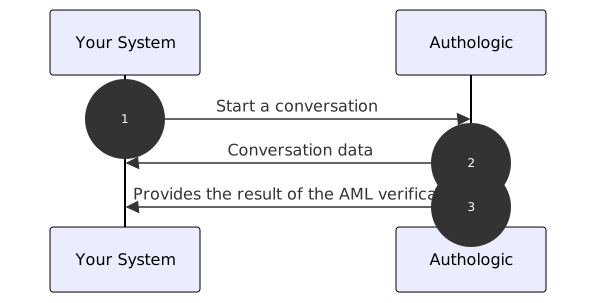
- Start of the identity verification process. Your server calls the API method called: POST /api/conversations
- The response returns information about conversation identifier and status
- Authologic calls a callback on your server's side with the result of the verification
curl tool to show the API operation.
If you have not dealt with it, you can find a short guide on it here(opens in new tab).
Of course, there is nothing to prevent you from using the swagger tool directly, which you will find at the
link: here,
or any other tool, such as Postman or Insomnia.Creating a Conversation
identity product, so you will need to combine those two.
You can learn more about the identity product here and read more
about combining products here.In order to retrieve information about the user's presence on the AML lists, a conversation must be created. In this
example we will use two products together - the aml and identity. When using the aml product it is necessary to
specify which lists should be checked and provide the data that should be checked. Example:
Basic Auth based authentication described, among others, at
here(opens in new tab). Username and API key should be used as data.
By using the curl tool we use the -u option which is responsible for the use of Basic Auth.curl -X POST -u my_login "https://sandbox.authologic.com/api/conversations" \
-H "accept: application/vnd.authologic.v1.1+json" \
-H "Content-Type: application/vnd.authologic.v1.1+json" \
-d '{
"userKey": "7dfb9ded-c38f-49ae-95e2-307283a0b1f6",
"callbackUrl": "my_callback_url_here",
"returnUrl": "https://id.sandbox.authologic.com/c/{conversationId}/thankYou",
"query": {
"identity": {
"requireOneOf": [
[ "PERSON_NAME_FIRSTNAME", "PERSON_NAME_LASTNAME"]
]
},
"aml": {
"checks": ["PEP", "SANCTIONS", "ADVERSE_MEDIA", "SIP", "OTHER"]
}
}
}'
Of course, instead of my_login enter your login. You should be prompted for a password - at that point you should
enter the API key (do not confuse it with the password to the customer panel).
For my_callback_url_here you could use https://webhook.site/(opens in new tab) to generate callback url which will be responsible for
receiving user information from Authologic. Whether you will use webhook.site or other similar tool it is crucial
that it will correctly receive http request since it is required for the process of identification.
In the example above, we have set conversation to check the following lists:
PEP- List of persons in politically exposed positions.SANCTIONS- List of individuals for whom sanctions have been implemented.SIP- List of individuals with high risk, typically involved in criminal activities or suspicious activity has been found in the past. May have been involved in court proceedings, had previous criminal allegations, or been involved in financial crimes such as money laundering and terrorist financing.ADVERSE_MEDIA- List of publications related to a person.OTHER- List of individuals for whom other categories thanPEP,SIP,SANCTIONShave been implemented e.g.RCA,POI, etc.
A conversation defined this way returns an additional section in response to a query about its status:
{
  "id": "c12c1adc-3ff0-4d32-b95c-c593135c903e",
  "userKey": "7dfb9ded-c38f-49ae-95e2-307283a0b1f6",
  "url": "https://sandbox.authologic.com/c/c12c1adc-3ff0-4d32-b95c-c593135c903e",
  "status": "CREATED",
  "result": {
    "identity": {
      "status": "IN_PROGRESS",
      "user": {}
    },
    "aml": {
      "status": "IN_PROGRESS"
    }
  }
}
Information: status acts identically to the identity section.
When a conversation is completed, the AML product reports in the found field those lists in which the
current user was found. A detailed report can be obtained by using the dedicated API method described
in the next section.
{
  "id": "c12c1adc-3ff0-4d32-b95c-c593135c903e",
  "userKey": "7dfb9ded-c38f-49ae-95e2-307283a0b1f6",
  "url": "https://sandbox.authologic.com/c/c12c1adc-3ff0-4d32-b95c-c593135c903e",
  "status": "FINISHED",
  "result": {
    "identity": {
      "status": "FINISHED",
      "user": {
        "person": {
          "name": {
            "firstName": "Maria",
            "lastName": "Sochacka"
          }
        }
      }
    },
    "aml": {
      "status": "FINISHED",
      "found": ["PEP", "SANCTIONS", "ADVERSE_MEDIA", "SIP", "OTHER"]
    }
  },
  "info": [
    {
      "country": "PL",
      "method": "PSD2"
    }
  ]
}
Downloading Detailed Information
Having information on which lists the user was found on, it is possible to download a detailed report containing the collected information, e.g.:
curl -u my_login "https://sandbox.authologic.com/api/conversations/c12c1adc-3ff0-4d32-b95c-c593135c903e/aml/PEP" \
-H "accept: application/vnd.authologic.v1.1+json" \
-H "Content-Type: application/vnd.authologic.v1.1+json"
Parameterizing the call of the above method with the name of the AML list
PEP, SANCTIONS, SIP, ADVERSE_MEDIA we get the first page of results for a given list.
The response structure varies depending on the selected AML list. A detailed description of the response structure can be found in the AML product details section.