User Authentication - 5 Minutes Tutorial - API Integration
Prerequisites
The following information is required to be able to integrate with Authologic:
- Developer portal credentials,
- API Keys.
Developer Portal Credentials
The developer portal address and credentials were provided during onboarding.
Passwords And API Keys
During the onboarding you have received the API keys:
- API key allowing communication with Authologic.
- The key used to verify the data sent by Authologic by the callback mechanism.
Integration Overview
The entire user authentication process comes down to three steps:
- Sending to Authologic notification what data you want to get and what products you will use
- Redirecting the user to a unique address returned by Authologic
We have called the entire process 'conversation'. In the picture, the process looks like this:
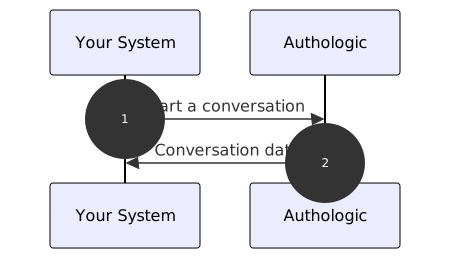
- Start of the identity verification process. Your server calls the API method called: POST /api/conversations
- The response returns information about conversation identifier and status
curl tool to show the API operation.
If you have not dealt with it, you can find a short guide on it here(opens in new tab).
Of course, there is nothing to prevent you from using the swagger tool directly, which you will find at the
link: here,
or any other tool, such as Postman or Insomnia.Authologic allows you to build a user login process (access authentication) to your system. To do this, the user must first register. After user registration, the user can be authenticated at any time.
Basic Auth based authentication described, among others, at
here(opens in new tab). Username and API key should be used as data.
By using the curl tool we use the -u option which is responsible for the use of Basic Auth.Registration
Registration involves adding the auth section when creating a conversation:
curl -X POST -u my_login "https://sandbox.authologic.com/api/conversations" \
-H "accept: application/vnd.authologic.v1.1+json" \
-H "Content-Type: application/vnd.authologic.v1.1+json" \
-d '{
    "userKey": "7dfb9ded-c38f-49ae-95e2-307283a0b1f6",
    "returnUrl": "https://id.sandbox.authologic.com/c/{conversationId}/thankYou",
    "query": {
        "auth": {
        }
    }
}'
Of course, instead of my_login enter your login. You should be prompted for a password - at that point you should
enter the API key (do not confuse it with the password to the customer panel).
After the user has gone through such a process and the conversation has been completed correctly, additional
data will appear in the response in the auth section, allowing for future user authentication. The exact
content depends on the specifics of the authentication method.
User Identification Methods
Some verification methods are able to determine the user themselves. In this case, simply redirect the user to
the authentication process. For such methods, a token is returned during registration - a unique user identifier.
The response always contains the following section:
"auth": {
  "status": "FINISHED",
  "token": "d42115b0-58d3-4e9b-b970-12ca7de181c7"
}
A Token is a unique key associated with a user and authentication method. Each time this user authenticates using
this method, this token will be returned.
Methods Verifying Specified User
Some verification methods are only able to answer the question whether the user is who he or she
claims to be. This method requires providing additional information that indicates the user who will
be authenticated. For such methods, token - a unique user identifier and challenge - the equivalent
of a login, are returned during registration. The response then contains the following section:
"auth": {
  "status": "FINISHED",
  "token": "d42115b0-58d3-4e9b-b970-12ca7de181c7",
  "challenge": "2e3c01a8-a983-4024-acc9-8005c57d10af"
}
A Token is a unique key associated with a user and authentication method. Challenge specifies
the user to be verified. Each time this user authenticates using this method, the appropriate challenge
must be sent - after successful authentication, the above token will be returned.
Authentication
Once the user has successfully registered, authentication operations can be performed. This means creating a
conversation with an auth section. There are some minor differences depending on the method used, described below.
User Identification Methods
For such methods, a sample conversation might look like this:
curl -X POST -u my_login "https://sandbox.authologic.com/api/conversations" \
-H "accept: application/vnd.authologic.v1.1+json" \
-H "Content-Type: application/vnd.authologic.v1.1+json" \
-d '{
  "userKey": "7dfb9ded-c38f-49ae-95e2-307283a0b1f6",
  "returnUrl": "https://id.sandbox.authologic.com/c/{conversationId}/thankYou}",
  "query": {
    "auth": {
    }
  }
}'
As you can see, authentication in practice is no different from registration. After going through the process, the response may contain the following section:
"auth": {
  "status": "FINISHED",
  "token": "d42115b0-58d3-4e9b-b970-12ca7de181c7"
}
Token directly identifies which user has passed authentication.
Methods that verify the specified user
For such methods, a sample conversation might look like this:
curl -X POST -u my_login "https://sandbox.authologic.com/api/conversations" \
-H "accept: application/vnd.authologic.v1.1+json" \
-H "Content-Type: application/vnd.authologic.v1.1+json" \
-d '{
  "userKey": "7dfb9ded-c38f-49ae-95e2-307283a0b1f6",
  "returnUrl": "https://id.sandbox.authologic.com/c/{conversationId}/thankYou",
  "query": {
    "auth": {
      "challenge": "2e3c01a8-a983-4024-acc9-8005c57d10af"
    }
  }
}'
In this model, it is necessary to provide challenge for the method to be able to determine
which user it is verifying. After going through the process, the response may contain the
following section:
"auth": {
  "status": "FINISHED",
  "token": "d42115b0-58d3-4e9b-b970-12ca7de181c7",
  "challenge": "2e3c01a8-a983-4024-acc9-8005c57d10af"
}
Token directly identifies which user has passed authentication. Challenge should match the value
provided when creating the conversation.